
Booth-less simultaneous interpretation
Simultaneous interpretation at your venue, without a booth.
Our interpreters work remotely from their own home or office. At the venue you only need an operation desk the size of two tables, plus receivers for your guests. Two of our technicians handle everything from delivery and setup to teardown.
- At the venue
- An operation desk on two tablesNo interpreter booth
- Setup
- About 2 hours on the dayDay-before setup is usually not needed
- Interpreters
- The best fit, wherever they liveNo travel or hotel costs, because they do not come to the venue
- On-site staff
- Two Oyraa techniciansOn site from delivery to teardown
- Capacity
- Up to 6 languages and 1,000 receiversDepends on the date
How it looks
The venue and the interpreters
Switch to the conventional booth setup to compare the two. Hover over a number to highlight that part of the drawing.
Scroll sideways to see the whole drawing.
- 1
Speaker microphone and venue camera
The venue audio and a camera view of the speaker come into the operation desk. The slides are shared with the interpreters too.
- 2
Operation desk (two tables)
This is where the laptops and the transmitter sit. Our two technicians run it from setup to teardown and watch the audio and the connection during the event.
- 3
Internet
Carries the venue audio and video to the interpreters, and brings the interpretation back to the venue on a separate channel for each language.
- 4
Two interpreters, in separate places
Each works from their own home or office, following the video and the slides, and they take turns every 15 to 20 minutes.
- 5
Infrared radiators
Send the interpretation across the room by infrared light. It cannot be heard outside the room, so it suits confidential meetings.
- 6
Guests with receivers
Receivers and earphones are handed out at reception. Guests pick a channel to hear their language.
- 1
Speaker microphone
Sends the venue audio to the interpreters in the booth.
- 2
Interpreter booth (for two)
A soundproof cabin, about 1.6 to 1.8 m wide and deep and 2 m high. It sits at the back of the room with a view of the stage, and has to be delivered and assembled.
- 3
Two interpreters, on site
They interpret from inside the booth and are booked from arrival to finish. Travel, and a hotel for distant venues, are extra.
- 4
Operation desk (engineer)
Connects the booth to the transmitter and balances the audio.
- 5
Infrared radiators
Send the interpretation across the room. This part is the same as the Oyraa setup.
- 6
Guests with receivers
Guests listen on receivers and earphones. This part is also the same.
Why booth-less
Why clients choose the booth-less setup
- 01
The best interpreters, wherever they are
Because interpreters do not travel to the venue, we can choose from our network in Japan and abroad the people who best match your subject and languages. They do not need to live in the same city.
- 02
Two tables of space, set up on the day
No booth to deliver or assemble. We set up in about two hours on the day, even in banquet rooms or pavilions where a booth would not fit.
- 03
Lower costs
No booth rental and no interpreter travel or hotel costs. You also usually avoid booking the room the day before for setup.
- 04
One partner from planning to the event
We arrange the interpreters, the equipment and the technicians, so you deal with a single contact.
Oyraa, Inc. has provided interpreting services since 2017. More than 900 companies have used our services, and we cover more than 150 languages.
Signal flow
How the audio travels, in four steps
- STEP 1Venue to interpreters
Send the sound and video
The operation desk sends the venue audio, the camera view and the slides to the interpreters over the internet.
- STEP 2Interpreters
Interpret remotely
Two interpreters in separate places follow the video and take turns. Their audio comes back on a separate channel for each language.
- STEP 3Interpreters to venue
Broadcast by infrared
The operation desk receives the interpretation and sends it through the transmitter and radiators to the whole room.
- STEP 4Guests
Listen on a receiver
Japanese speech goes to the English channel and English speech to the Japanese channel, so interpretation works in both directions.
On site
At a real event
Photos from an event we supported.
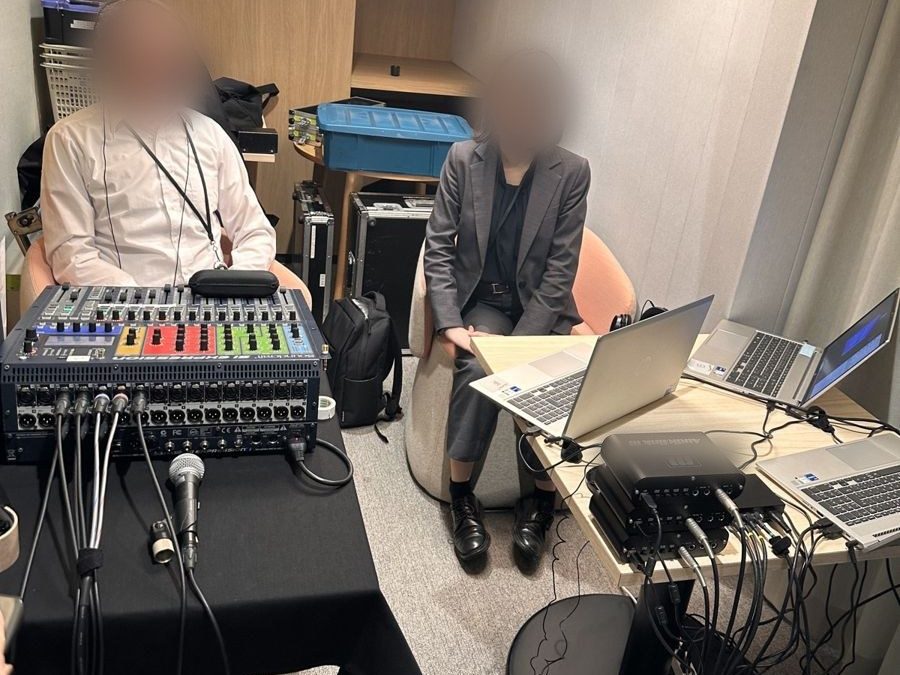
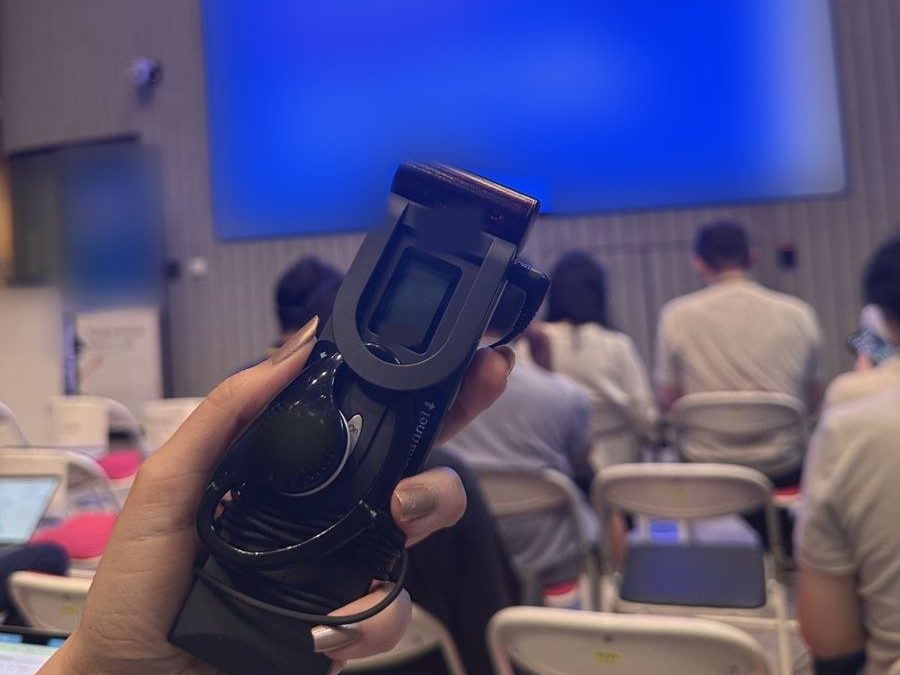
Infrared (standard)
Sends the audio by light, so it stays inside the room.
- It cannot be heard outside the room, so nothing leaks. Good for confidential meetings.
- Not suited to rooms with black walls, or halls with few places for the radiators.
Radio
For venues where infrared does not work well, we propose a radio system.
- Works in almost any room and is quick to set up, even in large halls.
- The signal reaches outside the room, so it is not suited to confidential meetings.
Day of the event
The day of the event
Example: a seminar with doors at 17:30 and a start at 18:00.
With many languages or receivers, setup can take more than two hours. For early-morning starts, or large events that need a rehearsal, we set up the day before. For a venue that is new to us, we ask for a site visit or a call with the venue staff beforehand.
Comparison
Booth-less compared with a booth
| Booth-less (Oyraa) | Conventional booth | |
|---|---|---|
| Where interpreters work | Home or officeEach joins remotely from a different place | In a booth at the venue |
| At the venue | Operation desk (two tables), radiators, receivers | Booth, operation desk, radiators, receivers |
| Space needed | Two tablesCan also go in an adjoining room | About 2 m by 2 m per booth, plus the deskNeeds a view of the stage |
| Setup | About 2 hours on the dayLonger with many languages or receivers | The booth must be assembled, so setup is often the day before or early morning |
| Teardown | About 1 hour | Longer, as the booth is taken apart and removed |
| Interpreter travel and time | NoneThey join from the pre-event connection test | From arrival until the endDistant venues may need a night's stay |
| Choosing interpreters | Anyone suited to the content, wherever they live | Only those who can travel to the venue |
| Venue requirements | Wired LAN (or Wi-Fi) and power | Access route and floor space for the booth |
| Cost item | Booth-less (Oyraa) | Conventional booth |
|---|---|---|
| Interpreter booth | None | Rental, delivery and assembly |
| Equipment and technicians | Receivers and other equipment, two techniciansSame-day setup | Receivers and other equipment, techniciansDay-before setup raises the setup fee |
| Interpreting fees | The same | The same |
| Interpreter travel and hotel | None | At costDistant venues may add a hotel and travel time |
| Extra venue hire | Usually none | A day-before setup can add to the room hire |
Prices depend on the venue, the number of guests, the languages and the hours. Outside Tokyo and Osaka, equipment transport and technician travel are added. Tell us the date, venue, number of guests and languages, and we will send a quote within one business day.
A booth has its strengths: interpreters feel the room directly and do not depend on an internet connection. For large international conferences where a booth is the better choice, we can set one up as well.
Checklist
What we need from you, and what we bring
From the venue
- 2 tables and 2 chairs for the operation desk
- 5 power outlets
- 1 audio feed from the venue sound system
- 1 wired LAN port
or permission to use the Wi-Fi - Delivery times and route, and vehicle parking
What Oyraa brings
- 2 interpreters, including preparation (reading the materials, checking terminology)
- Receivers and earphones
- Transmitter and radiators
- The operation desk kit (laptops, camera and more)
- The connection to the interpreters and a channel for each language
- 2 technicians, from delivery to teardown
From the organizer
- Slides and the program in advance
- Whether there will be online attendees
(this changes the streaming setup) - Contact details for the venue staff
Use cases
Where it works well
- Talks and seminars for visiting delegationsGuests hear Japanese talks in English or other languages at the same time.
- Incentive trip meetings and award ceremoniesRuns in a hotel banquet room without a booth.
- Events outside TokyoNo need to bring interpreters in from Tokyo or elsewhere.
- Venues where a booth will not fitSmall banquet rooms, pavilions, and talks over dinner in restaurants.
- Short sessions of one to two hoursSame-day setup makes short events easy to arrange.
- Events with three or more languagesUp to six languages, each on its own channel.
FAQ
Frequently asked questions
How many guests can you handle?
We can provide up to 1,000 receivers, depending on the date. That covers anything from a small meeting to a large seminar.
Can you handle three or more languages?
Yes, up to six languages, each on its own channel. More languages can mean a longer setup and more technicians.
What if the connection drops?
We use the venue's wired LAN wherever possible and test the connection before the event. During the event a technician watches the connection at all times and fixes problems on the spot.
How do remote interpreters know what is happening in the room?
They follow the venue camera and the slides as they interpret. If you send the materials in advance, they can also prepare the terminology.
Does it work if some attendees join online?
Yes. The streaming setup, equipment and cost may change, so please let us know early if there will be online attendees.
Are the receivers hard to use?
Guests switch them on and pick a channel. We explain it at reception. Lost receivers are charged at cost.
How far ahead should we book?
We recommend contacting us at least three weeks ahead so we can secure the equipment and interpreters. We also take urgent requests.
Do you cover venues outside Tokyo and Osaka?
Yes. Equipment transport and technician travel are added. Because interpreters do not travel to the venue, we can still assign experienced interpreters to events anywhere.